How I screwed up OPNsense on Proxmox
A cautionary tale. OPNsense gets confused when you change hardware, and it's a little too easy to lock yourself out of Proxmox.
First some background
My local zone is chunked into several networks. Router-on-a-stick; all 1GbE.
My router is a Lenovo M920q Tiny with an Intel quad 1GbE NIC stuffed in. It runs OPNsense. The M920Q and similar are very capable and flexible little PCs. I got very lucky and found mine for $175ish on eBay all done up.
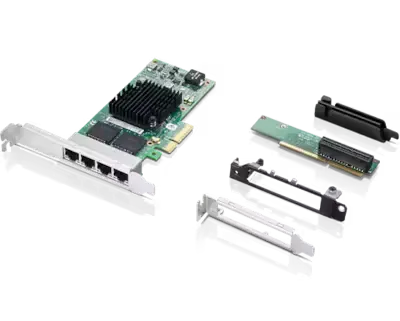
Lenovo M920q, M920x, M720q, and P330 models have an expansion slot.
MPN 00YK613, Intel I350-T4.
A T2 flavor is also available. Lenovo packaged it with a riser and a LP bracket as 4XC0R41416.
Source the parts on eBay, Amazon and probably other marketplaces. There are also risers available which break the x16 lane out into two M.2 slots and an x4 lane.
Why Proxmox?
When I set this up ~2 years ago, I was looking at the M920q and thinking “Man, this is so overkill”.
So I set up Proxmox on it and virtualized OPNsense.
- Pros & cons
- + flexibility
- + optimized resource consumption
- + practicing new things
- - configuration complexity
- - attack surface
I picked the more delicate configuration so I could do more than just OPNsense. And being newer to Proxmox at that time, I thought it would be a good learning experience.
Narrative
OPNsense had problems negotiating an LACP link with my physical switch. I figured this was a virtualization issue.
Instead of fighting with it, I configured Proxmox to manage LACP and present a single virtual interface to
the OPNsense VM as vtnet1. OPNsense didn’t know or care that it was an LACP group.
Everything worked beautifully for maybe 16 months. Not a peep. One time I forgot to turn off a packet capture and filled the boot disk. The web server couldn’t start but I was able to SSH in and fix it.
Initially I did use Proxmox to virtualize other software, but eventually I built a dedicated 3-node cluster. This gave me so much compute at my disposal I stopped caring about the router being overkill and just wanted it to be a router. The Proxmox installation became an occasional maintenance checkbox.
Then I made a mistake. I added and later removed TOTP from Proxmox’s user and root accounts, both times using the GUI. Expectation: I would no longer need a TOTP to log in. Reality:
I’m not the only poor fool - see here, here, here, here, and here.
And if you’ve oh, I don’t know, maybe disabled SSH access to the system, WELL!
In retrospect I don’t remember if I put a monitor on it and tried to log in at the console. Probably there was a way to fix it. It’s not really important - I decided OPNsense was going on bare metal.
Backing up and restoring OPNsense
…is really, really easy. Hit backup, XML file comes out. Hit restore on the new system; XML file goes in. Your router is back.
I expected the hardware change to result in an invalid configuration. I also expected that OPNsense would give me easy tools to fix it. Not so. For example, when you try to reassign one VLAN via built-in script, OPNsense warns you that this will erase all VLAN configurations. No thank you.
Solving this problems
OPNsense is opinionated about using the GUI. It really wants you to use the GUI. And I don’t have a ton of hours in FreeBSD. So I didn’t want to go taking a hammer to things.
Instead I simply made changes directly to the OPNsense XML. It’s a nearly-exact reflection of the GUI. For example, here’s the as-exported configuration of my guest network.
<opt3>
    <if>vlan0.30</if>
    <descr>VLAN30_27</descr>
    <enable>1</enable>
    <lock>1</lock>
    <spoofmac/>
    <ipaddr>192.168.30.1</ipaddr>
    <subnet>27</subnet>
</opt3>
<opt4>
    <if>vtnet1</if>
    <descr>LACPTRUNKPXE</descr>
    <enable>1</enable>
    <lock>1</lock>
    <spoofmac/>
</opt4>
And later on, the VLAN config:
<vlan uuid="">
    <if>vtnet1</if>
    <tag>30</tag>
    <pcp>0</pcp>
    <proto/>
    <descr>Guest</descr>
    <vlanif>vlan0.30</vlanif>
</vlan>
Since I never had a LACP LAG configured in OPNsense XML parlance and thus had no reference material, I loaded a fresh OPNsense installation and created a LAGG. Then I exported that config:
<laggs version="1.0.0" persisted_at="" description="LAGG devices">
<lagg uuid="">
    <laggif>lagg0</laggif>
    <members>igb0,igb1</members>
    <primary_member/>
    <proto>lacp</proto>
    <lacp_fast_timeout>0</lacp_fast_timeout>
    <use_flowid/>
    <lagghash/>
    <lacp_strict/>
    <mtu/>
    <descr/>
</lagg>
</laggs>
And pasted this chunk of code into my “working” copy of my config backup XML. So now my configuration, when loaded, would be configuring a LAGG on the correct interfaces.
Then I went network by network and VLAN by VLAN, and assigned them mostly to the LAGG. I took this opportunity to swap around the opt1, opt2, etc names to fit
my naming schema preferences, because these identifiers aren’t directly mutable in the GUI.
And then I reinstalled OPNsense again, with ZFS, and imported my corrected config, and boom: it fired right up, link lights everywhere, no configuration problems or security holes.
All in all this took me about 5 hours to muddle through while half-focused on the Artemis II post-launch.
Lessons learned
- Be cautious with TOTP on Proxmox
- Expect hardware changes to break stuff. Break the stuff on purpose ahead of time, while you still have access to the GUI
- Supersede - don’t replace. I wiped out my old Proxmox install before I realized I was opening a can of worms. Everything worked out, but in a real-world setting I would not have had the option to undo my decisions. If I’d used a fresh boot disk, I could always have fallen back to the inaccessible-but-working Proxmox/OPNsense stack until a more suitable downtime window.
Resources
- OPNsense has some useful scripts you can run from the shell Some of them are listed in the docs.
There’s useful stuff in /usr/local/opnsense/scripts, but you shouldn’t have to use these unless something has gone horribly wrong
or you majored in FreeBSD and hate GUIs.